REVIEW · SEOUL
South Korea: Unlimited Data and Voice eSIM
Book on GetYourGuide →Operated by LINK KOREA · Bookable on GetYourGuide
A working phone in Korea should not be a drama.
This unlimited 4G LTE eSIM runs on SK Telecom’s network and is built for fast online access as soon as you land. I like the simple promise: scan, connect, and use data right away—plus hotspot sharing if you need it. The catch is the setup can be picky for some phones, and the voice/SMS feature comes with extra steps.
If you’re the kind of traveler who lives on maps, messaging, and ride apps, this plan fits that reality. You get a stable connection option (not just “low-speed survival mode”), and you choose a validity window from 3 to 90 days depending on your trip length. One drawback to watch: voice & SMS require passport verification, and until that’s done the SIM may be data-only.
So before you buy, make sure your phone is truly eSIM-capable and SIM-ready for Korea. When those two boxes are checked, this is a great value way to stay connected; when they’re not, you can spend your first evening troubleshooting instead of exploring.
In This Review
- Key things to know before you activate
- Unlimited data eSIM for South Korea: what you’re really buying
- Price and value: why $8 can make sense
- The flow you’ll follow: from email to working phone
- Step 1: Before you fly, make sure your phone can do eSIM
- Step 2: Get the correct QR code (important detail)
- Step 3: Land in Korea, then let the eSIM connect
- Step 4: Data works immediately; voice and texts come later (optional)
- Activating in real life: what “easy” should look like
- Voice and SMS in Korea: the passport verification step that changes everything
- Network stability and hotspot sharing: when this shines
- The common snags: how to avoid wasting your first evening
- 1) Using the wrong QR code
- 2) Your phone doesn’t show the eSIM
- 3) Data disconnects mid-install
- 4) Voice/SMS doesn’t work yet
- 5) Language or pace issues
- Who should buy this eSIM (and who should skip it)
- Quick practical tips to get the most out of your $8
- Should you book this unlimited data eSIM for South Korea?
- FAQ
- What does this eSIM include?
- Is the data truly unlimited in Korea?
- How do I get the eSIM QR code?
- How do I know if my phone supports eSIM?
- When does activation start?
- Can I use hotspot sharing?
- Are voice calls and SMS available right away?
- How do I activate voice and SMS features?
- Do I get a local Korean number?
- What should I do if I see a QR code invalid message?
- Can I buy this if I’m a Korean passport holder?
Key things to know before you activate
- Unlimited 4G LTE data with no speed throttling
- SK Telecom (SKT) network connection starts when you’re in Korea
- Validity options from 3 to 90 days, activated on a set schedule by hours
- Hotspot sharing is supported
- Voice & SMS work only after online passport verification (and requires later recharge)
- Keep your eSIM QR code separate from the QR in your voucher email
Unlimited data eSIM for South Korea: what you’re really buying
This is a short-term tourist data eSIM for South Korea, priced at $8 per person, with a plan that emphasizes one thing: always-on connectivity.
Instead of counting megabytes, you’re paying for unlimited 4G LTE data without speed throttling. That matters because in Korea you’ll likely burn data fast: navigation, transit apps, food searches, hotel messages, photo uploads, and the constant “where is this place exactly?” moments.
The eSIM is also designed to be practical on arrival. You don’t need a local SIM kiosk exchange the way you might in the past. You get an eSIM (not a physical card), and once the eSIM is active on SKT’s network, you’re online.
What you don’t get is unlimited calling in the simple sense. The plan includes incoming calls and texts, but voice & SMS are tied to a passport verification process. Until you complete that step, you should assume you’re using data only.
You can also read our reviews of more tours and experiences in Seoul.


Price and value: why $8 can make sense
At face value, $8 for unlimited 4G LTE data in Korea sounds like a steal. But the real question is value for how you travel.
This product is most worthwhile if:
- You’ll rely on your phone as your main navigation tool
- You plan to use messaging apps for practical coordination (hotel, friends, ride pickups)
- You want to share data via hotspot with a travel partner
If you’re the type who only checks email occasionally, any unlimited data plan might be overkill. But if you’re actively using your phone all day, unlimited (with no throttling) usually saves you from switching to Wi‑Fi every time data drains your budget.
Also, consider the “cost” of hassle. eSIM setups go smoothly for many people, but if your phone doesn’t support eSIM properly, you’ll pay in time, not money.
The flow you’ll follow: from email to working phone
Think of this less like a guided tour and more like a clean activation process with optional upgrades.
Step 1: Before you fly, make sure your phone can do eSIM
Your first job is confirming eSIM compatibility.
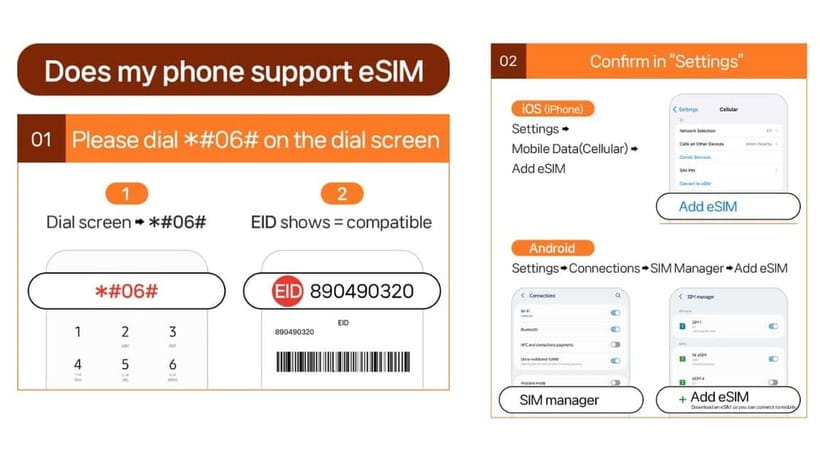
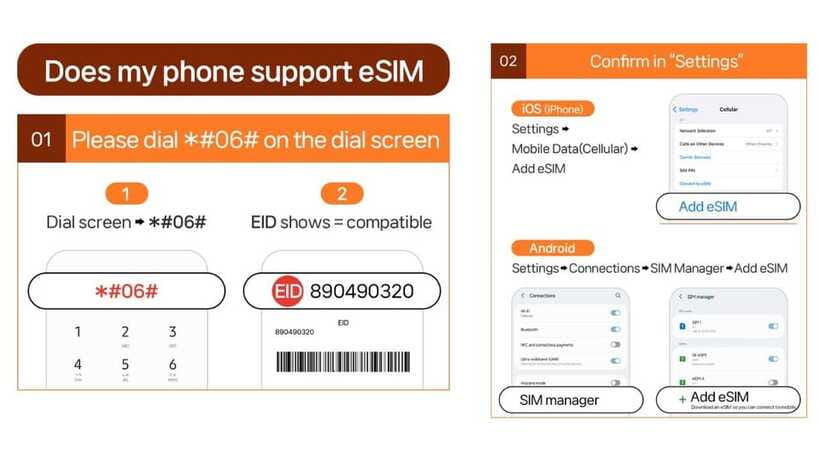
The provider’s checklist is simple: press #06# on your dial screen and look for EID. If you don’t see EID, your device may be incompatible.
You also need your phone to be SIM-free (able to accept foreign SIMs). If you’re coming from a phone plan that locks you to one carrier, this can cause trouble.
No guesswork here. If you’re unsure, check before purchasing.
Step 2: Get the correct QR code (important detail)
There’s a common mix-up to avoid:
- The QR code in your GetYourGuide voucher is not the eSIM QR code.
- Your actual eSIM QR code is delivered by email 1 day before the activity date.
So if you try scanning the voucher QR on day one and things look wrong, it’s not you being careless. It’s just the wrong code.





Step 3: Land in Korea, then let the eSIM connect
The eSIM doesn’t fully “wake up” just because you installed it.
The information you’re given says the eSIM will connect to the local network after you arrive in Korea.
Once it’s connected to SK Telecom (SKT), the plan activates based on hours. For example, a 3‑day option is activated and ends on a schedule like JAN 1 at 22:00 through JAN 4 at 22:00. That timing detail matters if your trip runs late on the last day.
Step 4: Data works immediately; voice and texts come later (optional)
Data is the main feature you can count on.
Voice calls and SMS require online verification using a passport-based system.
After verification, you get a Korean phone number (a 010 number) and voice & text features can be enabled.
You also receive complimentary 1,320 KRW voice credits for domestic calls—roughly a few minutes, depending on current call rates (the estimate given is until DRP 20, about 5 minutes of domestic calls).
So: plan your first night around data. Plan your call/text needs around the verification step.
Activating in real life: what “easy” should look like
The good news: the strongest praise centers on speed and stability.
When activation goes right, it’s fast: scan the correct eSIM QR code, install, and you’re online with a stable signal.
Here’s how to make it go right for you:
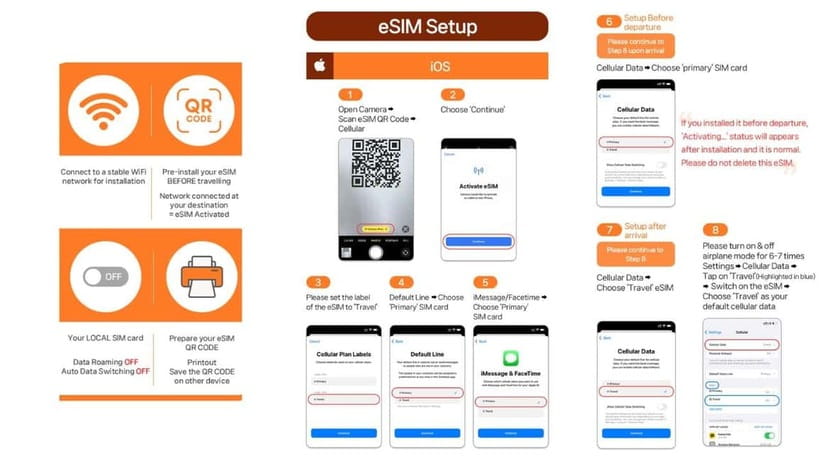
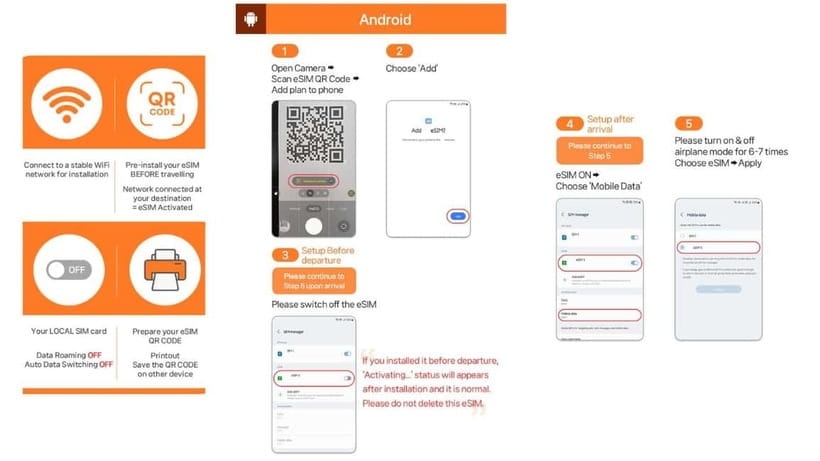
- Install the eSIM only after you have the correct QR code in email
- Expect the connection to happen when you’re actually in Korea
- If you see errors like QR code invalid, treat it as a troubleshooting prompt, not a dead end
If you hit the classic QR problem, the guidance is clear:
- On iPhone: go to Settings > Cellular
- On Android: go to Settings > Connections > SIM Manager
- Check whether a new eSIM appears there
If it appears, you may just need to select/confirm it instead of repeatedly re-scanning.
If it doesn’t appear, contact the provider support by email or WhatsApp listed for LINK KOREA. That’s the fastest path compared to guessing.
Voice and SMS in Korea: the passport verification step that changes everything
If voice and SMS matter to your trip (pickup calls, texting a host, verifying accounts with a local number), read this part carefully.
Voice & text features are available only after:
- You complete online passport verification
- You do it during the operating hours 08:00–22:00 every day
- Verification can only be performed 1 hour after entry
- You may need to provide the rental contract number and the eSIM phone number during verification
The provider uses a specific website for the verification flow: www.skroaming.com/passport/.
After verification, there’s also a recharge requirement to use the call feature. The recharge site provided is: https://skroaming.com/reservation/charging.
So what’s the practical takeaway?
- Don’t assume calling works instantly after you install the eSIM.
- Set yourself up so you have data first, then complete verification when you’re in Korea and the timing window is open.
This is the part that can turn into an evening headache if you’re trying to do everything at once.
Network stability and hotspot sharing: when this shines
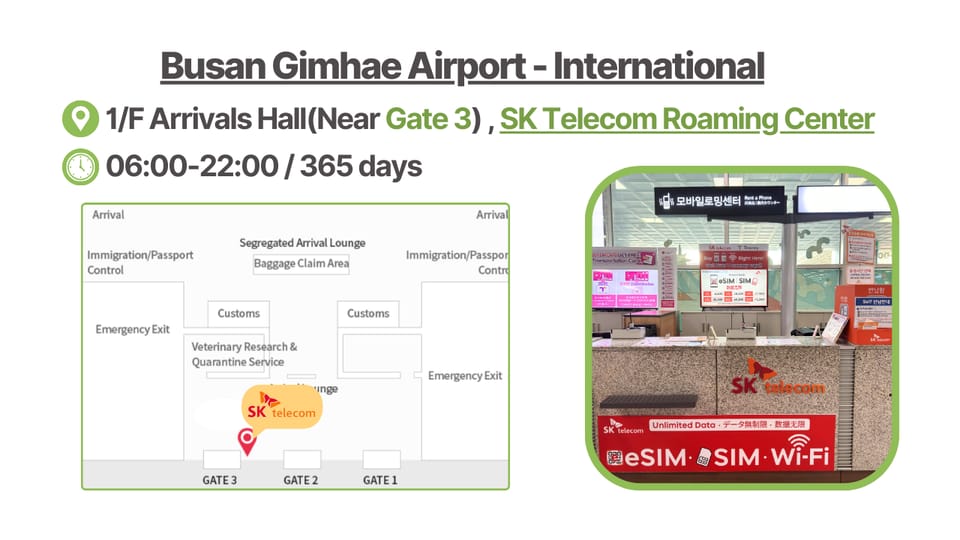
A big part of the value here is that you’re getting unlimited data without speed throttling on a mainstream Korean carrier network (SKT).
That combination matters most when you:
- Use maps for hours
- Check transit schedules constantly
- Stream a bit when Wi‑Fi isn’t available
- Share data via hotspot (supported)
Hotspot support is a real quality-of-life feature for two-person travel. It can also save you from hunting for free Wi‑Fi in crowded areas, because your phone can become the reliable “base connection.”
Just keep your expectations realistic: hotspot drains battery fast, so bring a charging plan.
The common snags: how to avoid wasting your first evening
You’ll see a few repeat problems that are easy to prevent.
1) Using the wrong QR code
The voucher QR is not the eSIM QR. Your eSIM QR arrives separately by email 1 day before.
If you scan the voucher code, you’re likely to get stuck.
2) Your phone doesn’t show the eSIM
If activation seems to fail, check the SIM Manager / Cellular settings to see whether an eSIM profile appears.
This simple check often tells you if the installation worked but the connection didn’t.
3) Data disconnects mid-install
If data drops during setup, don’t keep restarting blindly.
Go back to your settings to confirm the eSIM is listed, then reconnect once the device is on SKT’s network coverage.
4) Voice/SMS doesn’t work yet
This one isn’t a malfunction. It’s the design.
Voice/SMS depend on the passport verification system, and you can’t treat it like a “data install equals calls instantly” product.
5) Language or pace issues
If you need help in person, you can contact LINK KOREA for assistance. One guide/assistant named Kenny is specifically mentioned as engaged and informative, which is the vibe you want when you’re trying to get a phone set up quickly.
Who should buy this eSIM (and who should skip it)
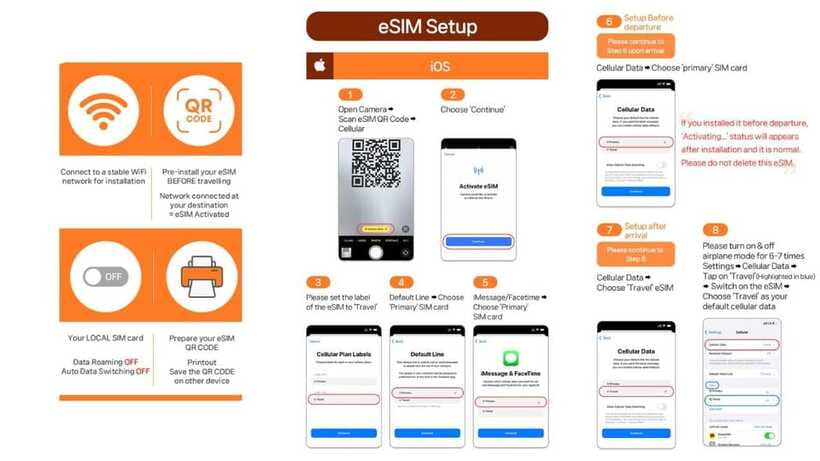
This eSIM is a strong match for:
- Short trips where you want unlimited 4G LTE data for the full duration
- Travelers who can follow a clear step-by-step setup
- Anyone who wants hotspot sharing for a partner’s phone
It may be the wrong choice if:
- Your phone doesn’t support eSIM (no EID on #06# is a red flag)
- You need voice calling immediately without time to do verification
- You’re coming for 91 days or longer (the product is described as a tourist service within 90 days)
Also note an important eligibility rule:
Only foreigners with an overseas passport can buy this. Korean passport holders can’t purchase.
Quick practical tips to get the most out of your $8
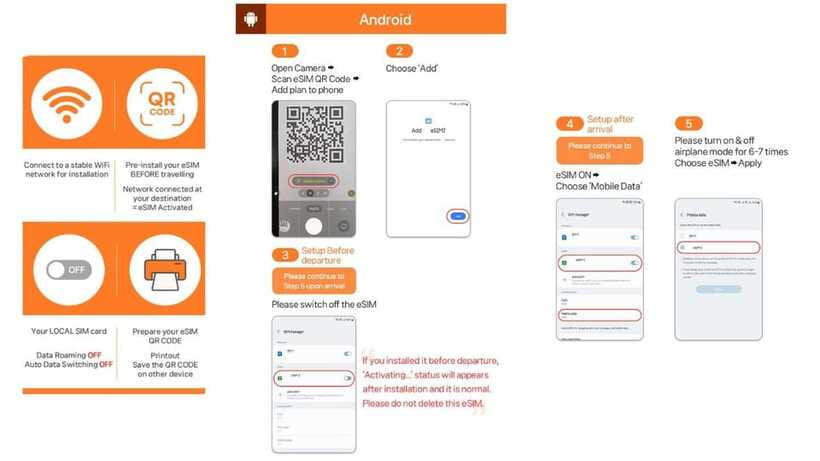
- Save the eSIM QR email. Don’t rely on memory of where it is.
- When you land, connect and confirm you have data before trying complicated tasks.
- If you plan to use calls/texts, schedule verification time in Korea during 08:00–22:00, and remember the “1 hour after entry” rule.
- Keep your passport handy. The verification system relies on passport ID.
- If you’re building plans with a host, keep a backup plan for contact until voice/SMS are active.
Should you book this unlimited data eSIM for South Korea?
Yes, if you meet the basics and your phone is eSIM-ready.
If you want stable unlimited data from a real carrier network and you’re comfortable following a QR-based activation flow, this is excellent value.
No, if your trip depends on calls/texts from minute one, or if your device might struggle with eSIM installation. The voice/SMS process adds steps, and the eSIM has to be compatible to begin with.
My rule of thumb:
- Buy it when data is your priority.
- Treat voice/SMS as a bonus after you finish verification.
FAQ
What does this eSIM include?
It includes unlimited 4G LTE data and an eSIM. Incoming calls and text messages are included without additional charges, but voice & SMS features require verification.
Is the data truly unlimited in Korea?
Yes. The eSIM offers unlimited data without speed throttling.
How do I get the eSIM QR code?
The QR code in your voucher is not the eSIM QR code. The eSIM QR code is delivered to you separately via email 1 day before the activity date.
How do I know if my phone supports eSIM?
Dial *#06# and check whether EID shows. If no EID appears, your device may be incompatible.
When does activation start?
The eSIM starts instantly when connected to SKT’s network, based on hours for your chosen validity period. It connects to the local network after you arrive in Korea.
Can I use hotspot sharing?
Yes. Hotspot sharing is supported.
Are voice calls and SMS available right away?
Voice & SMS require online verification. Until verification is done, the eSIM can be used for data services.
How do I activate voice and SMS features?
You’ll need to complete passport verification on the provided website (www.skroaming.com/passport/). Operating hours are 08:00–22:00, and verification can only be performed 1 hour after entry.
Do I get a local Korean number?
Yes. After validation, a 010 phone number is provided.
What should I do if I see a QR code invalid message?
Check whether a new eSIM appears in your settings:
- iOS: Settings > Cellular
- Android: Settings > Connections > SIM Manager
Then contact LINK KOREA if problems continue.
Can I buy this if I’m a Korean passport holder?
No. Only foreigners with an overseas passport are eligible.