REVIEW · SEOUL
Gimpo Airport: Traveler SIM and T-money Transportation Card
Book on GetYourGuide →Operated by Roaming Star Inc · Bookable on GetYourGuide
Landing is the hard part. This makes it easier.
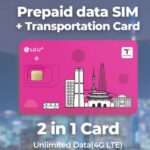
This Gimpo Airport setup pairs a traveler SIM with unlimited 4G LTE and a T-money transit card, so you’re not stuck trying to sort phone data and local payments right after you land. I like that a greeter meets you at the airport counter to help confirm your SIM is working. I also love that you can choose a SIM period from 3 days up to 2 months, matching real trip lengths and not forcing a one-size plan.
The main drawback to consider is simple: a T-money card needs charging before it works, and you also won’t get outgoing calls/texts with this package. If you rely on sending lots of messages or calling while you’re out, you’ll want a backup plan like messaging apps over data.
In This Review
- Key things to know before you go
- Gimpo Airport SIM + T-money: why this combo is so practical
- What you actually pick up at the counter (and what to do first)
- The SIM: unlimited 4G LTE, hotspot, and receive-only messaging
- The T-money card: subway, buses, convenience stores, and taxis
- Duration options: choosing 3 days vs 2 months without wasting money
- Day-by-day “itinerary” without the guesswork
- Day 1 (arrival): get online, then move
- Days 2 onward: transit-first travel
- Longer stays: keep data and sharing simple
- Compatibility notes that can save you a headache
- Communication limits: plan around outgoing messages
- Value check: is $12 a good deal?
- Who this experience suits best
- Should you book this Gimpo Airport SIM + T-money?
- FAQ
- Where do I pick up the SIM and T-money card?
- Is there help available when I activate the SIM?
- Does the SIM include unlimited data?
- Can I use the card on subways and buses?
- Do I need to charge the T-money card before using it?
- Can I use hotspot with this SIM?
- Are incoming calls and texts included?
- Are outgoing calls and outgoing texts included?
- Are SIMs available for different phone types?
- Are there any limits on purchases per passport?
Key things to know before you go
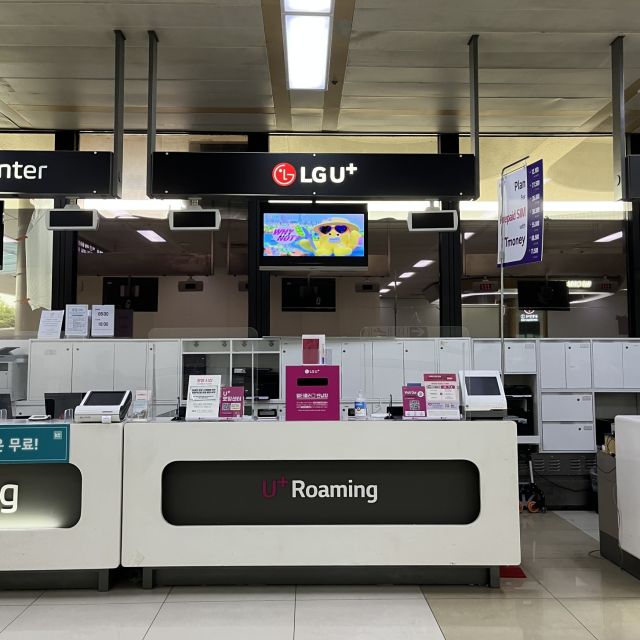
- Greeter support at Gimpo Airport: help at the counter to make sure your phone connects to data
- Unlimited high-speed 4G LTE: steady internet for maps, messaging, and sharing photos
- T-money included, but charged separately: use it for subways, buses, convenience stores, and card-accepting taxis
- Hotspot usage included: turn your phone into a mini Wi‑Fi source for your own devices
- Incoming calls/texts included; outgoing not included: plan around receive-only communication
- 3 purchases per passport limit: keep this in mind if you’re booking multiple options
Gimpo Airport SIM + T-money: why this combo is so practical
Gimpo Airport is your first test after a flight: new language, new card systems, and a phone that may or may not connect to data. This service tackles that head-on by giving you both tools right away. The SIM covers your internet needs, and the T-money card covers the “how do I pay to move around?” problem.
What makes this setup feel efficient is the way it reduces guesswork. You pick up at a Gimpo Airport counter, then staff assist you to activate the SIM and confirm data connectivity. That’s the difference between spending your first hour in South Korea hunting for settings and simply getting online so you can check maps and schedules.
And the T-money card isn’t just for rides. In South Korea, it’s commonly used for everyday payments—especially when convenience stores and transit are part of your daily rhythm. The listing also notes that some accredited taxis accept card-based use with the card system, which can matter if you don’t want to manage lots of cash.
You can also read our reviews of more tours and experiences in Seoul.



What you actually pick up at the counter (and what to do first)
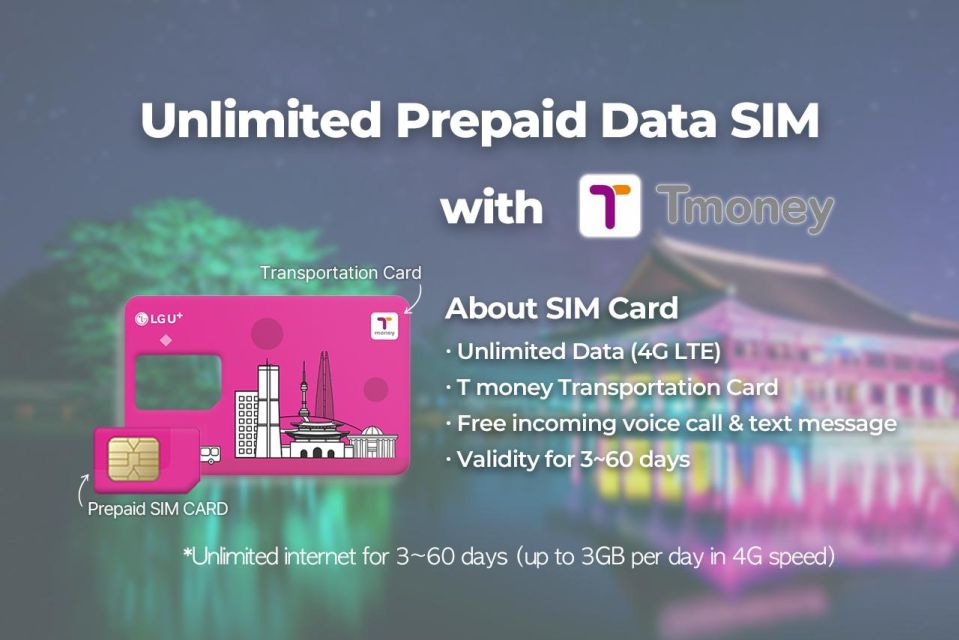
Your meeting point may vary depending on the option you book, but the pickup happens at Gimpo Airport at a designated counter. The greeter or host speaks English and Korean, and their job is to help you get things working.
Here’s the smart order of operations once you’ve received your items:
1) Activate the SIM and verify data
They’ll assist you so your phone is connected to mobile data. I strongly recommend you check that it works right away—open a map app and confirm you can load a page. Don’t assume the activation screen equals actual internet.
2) Start thinking of the T-money card as “ready after charging”
The T-money card is included, but the listing is clear: you need to charge it before you use it. If you try to tap it uncharged, it won’t help you at the exact moment you need it.
3) Test your basics before you head out
Once both are set, you’re ready to do what you came for: navigate, message, and pay for transit.
The SIM: unlimited 4G LTE, hotspot, and receive-only messaging
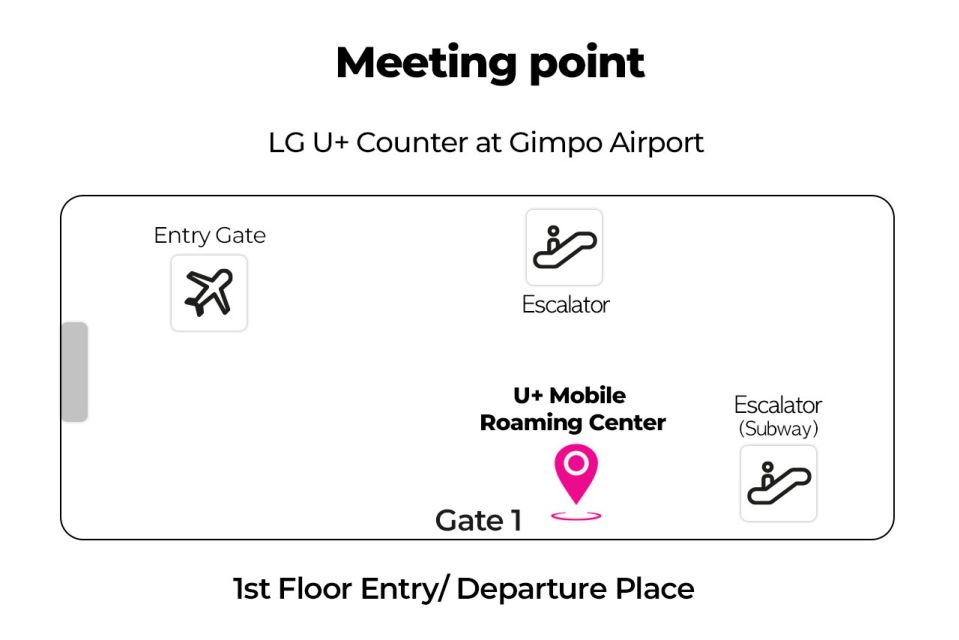
This is an unlimited 4G LTE data SIM with multiple SIM sizes supported (nano, micro, normal). The goal is straightforward: you stay online for maps, social apps, and checking email or work messages during your trip.
A few details matter for real-world use:
- Unlimited high-speed 4G LTE data is included, which helps with navigation accuracy and loading maps quickly.
- Hotspot usage is included, so if you have a second device (tablet, laptop, or a friend’s phone), you can share your connection.
- The plan includes incoming calls and text messages, plus data.
- Outgoing calls and text messages are not included, so if you plan to text people directly from the phone app, you might need to rely on data-based messaging instead.
If you’re the type who uses your phone for everything—maps, rides, translations, and updates—this SIM setup is designed for that. If you’re more traditional and want SMS-style outbound texting as your main method, you’ll want to rethink that habit.
The T-money card: subway, buses, convenience stores, and taxis
The T-money card is a public transportation card used across South Korea. The key advantage is that it simplifies daily movement: you tap in for subway rides and bus trips without fumbling with single tickets.
The listing also points out broader uses:
- Purchase items at convenience stores
- Use for public transportation (subways and buses)
- Use for accredited taxis that accept cards (as described)
One more practical note: you need to charge the card. Think of the card as a travel wallet that has to be funded before day-to-day use. Once charged, it reduces friction and keeps you from standing at the wrong machine or lining up for exact change.
Also, there’s a limit stated for the purchase itself: maximum 3 purchases per passport. That doesn’t affect how many times you can tap the card. It’s a booking limit for the SIM/T-money product options. If you’re traveling with family and plan multiple pickups under the same passport, this limit is something you should track early.
Duration options: choosing 3 days vs 2 months without wasting money
The duration range is broad: 3 days to 2 months, depending on the option you book. This is useful because phone data needs don’t scale linearly with “how many days you’re technically in the country.” Some people spend most of their time touring by day trips and need heavy navigation all day. Others are slower and might rely more on hotel Wi‑Fi between outings.
So how do you choose? Use a simple rule:
- If you’re doing a short city-focused trip, pick closer to the 3–7 day end and avoid overpaying.
- If your plan includes lots of transit days, day trips, and shared hotspot use, longer options can feel less stressful.
The SIM period is flexible because you can match your travel pace. That’s real value, especially if your schedule changes.





Day-by-day “itinerary” without the guesswork
This experience isn’t a sightseeing tour with a fixed list of places. It’s a setup that affects every day after landing. So the real itinerary is your activation day and your usage days.
Day 1 (arrival): get online, then move
The first stop is the Gimpo Airport pickup at the counter. You’ll receive the SIM and T-money card, then the greeter helps confirm your phone is connected to data.
Right after that, your goal is to leave with:
- working mobile data
- a transit card you can charge and tap
- a phone that can run your map app without stalling
Days 2 onward: transit-first travel
On subsequent days, the card becomes your daily helper. You’ll use T-money for:
- subway and bus rides (the core use)
- convenience store payments during the flow of travel
- card-accepting accredited taxis, when relevant
Meanwhile, the SIM handles your “information layer.” It keeps you connected for:
- mapping and route checks
- photos and social posting
- email and work access
- staying in touch with incoming calls and text messages
Longer stays: keep data and sharing simple
If you select a longer period (up toward 2 months), the included hotspot option can reduce your need to hunt down Wi‑Fi. You can share your connection with a second device without buying extra access at cafes or hotels.
Compatibility notes that can save you a headache
This part is not glamorous, but it’s where people often get stuck. The listing includes a couple of important compatibility points:
- Make sure your phone is carrier-free (the listing emphasizes it especially for phones from the United States, Canada, Japan, or the Philippines). In other words, confirm your handset can accept this service on the network.
- If you have an iPhone 14 model purchased in the United States, note that it doesn’t have a physical SIM tray and supports only eSIM.
If any of that is unclear for your device, check before you arrive so you’re not dealing with phone settings under time pressure at the airport.
Communication limits: plan around outgoing messages
Included:
- incoming calls and text messages
- data access
Not included:
- outgoing calls and text messages
That means you’ll likely want to rely on data-based messaging (like apps) for anything that requires sending messages outward. If you’re the kind of traveler who sends quick SMS texts to coordinate with a host or meet-up group, you may find it easier to shift to an app-based chat for the trip.
This isn’t a deal-breaker—it just affects your communication style.
Value check: is $12 a good deal?
The package is listed at $12 per person, and you can choose SIM duration from 3 days to 2 months. Here’s why it can be good value, even if the price sounds simple:
- You’re paying for airport setup help, not just a SIM card in a plastic sleeve. Getting assisted to confirm data connectivity reduces the risk of wasted time.
- Unlimited 4G LTE data plus hotspot usage is included, which helps you stay productive and avoid extra Wi‑Fi purchases.
- The T-money card is bundled for transit and everyday payments, so you’re not doing separate local card arrangements at the start.
The main reason it might not fit everyone is if you need outgoing calls/texts as your primary communication method. In that case, you might spend extra effort setting up an alternate way to message people.
Who this experience suits best
This setup is a strong match if you:
- want to land and immediately get online
- plan to use public transit daily (subways and buses)
- prefer convenience payments with T-money for convenience stores
- will benefit from hotspot for a second device
- like having real staff help you verify your phone data at the counter
It’s less ideal if you:
- rely heavily on outgoing SMS/calls and don’t want to use data apps
- have a phone model that may require eSIM handling and you’re not comfortable figuring it out quickly
Should you book this Gimpo Airport SIM + T-money?
I’d book it if your priority is getting operational fast: working data, a working transit payment card, and help from staff to make sure your SIM connects. For a short trip, the 3-day option can be a clean way to avoid scrambling for Wi‑Fi on day one. For a longer stay, hotspot support and unlimited 4G LTE reduce the temptation to buy extra internet.
Skip (or double-check before booking) if you strongly need outgoing calls/texts or you’re unsure whether your phone is compatible, especially with iPhone 14 US models and the eSIM-only note. If you match the use case, this is the kind of airport pickup that buys you peace of mind.
FAQ
Where do I pick up the SIM and T-money card?
You pick them up at the Gimpo Airport counter. The meeting point can vary depending on the option you booked.
Is there help available when I activate the SIM?
Yes. A greeter or host assists you at the airport counter and makes sure your phone connects to data.
Does the SIM include unlimited data?
Yes. It includes unlimited high-speed 4G LTE data.
Can I use the card on subways and buses?
Yes. The T-money card is a public transportation card for subways and buses.
Do I need to charge the T-money card before using it?
Yes. The card needs to be charged before use.
Can I use hotspot with this SIM?
Yes. Hotspot usage is included.
Are incoming calls and texts included?
Yes. Incoming calls and text messages are included.
Are outgoing calls and outgoing texts included?
No. Outgoing calls and outgoing text messages are not included.
Are SIMs available for different phone types?
Yes. The data SIM is available in nano, micro, and normal sizes.
Are there any limits on purchases per passport?
Yes. The maximum number of purchases per passport is 3.